When schools begin searching for software to manage their operations, two terms often appear: School ERP and School Management System.
At first glance, they may sound like two completely different categories of software. In practice, however, the distinction is not always so clear.
Some vendors describe their platform as a School ERP. Others use terms such as School Management System, School Management Software, School Information System, or even School Operating System. In many cases, these platforms offer overlapping features.
So, what is the actual difference between a School ERP and a School Management System? And more importantly, which one does your school really need?
The answer depends less on the label and more on how deeply the software connects your school's operations.
What Is a School Management System?
A School Management System is software designed specifically to help schools manage their day-to-day academic and administrative activities.
Instead of keeping student information in one spreadsheet, attendance in another system, fee records in accounting books, and examination results in separate files, a school management system brings these activities into a structured digital environment.
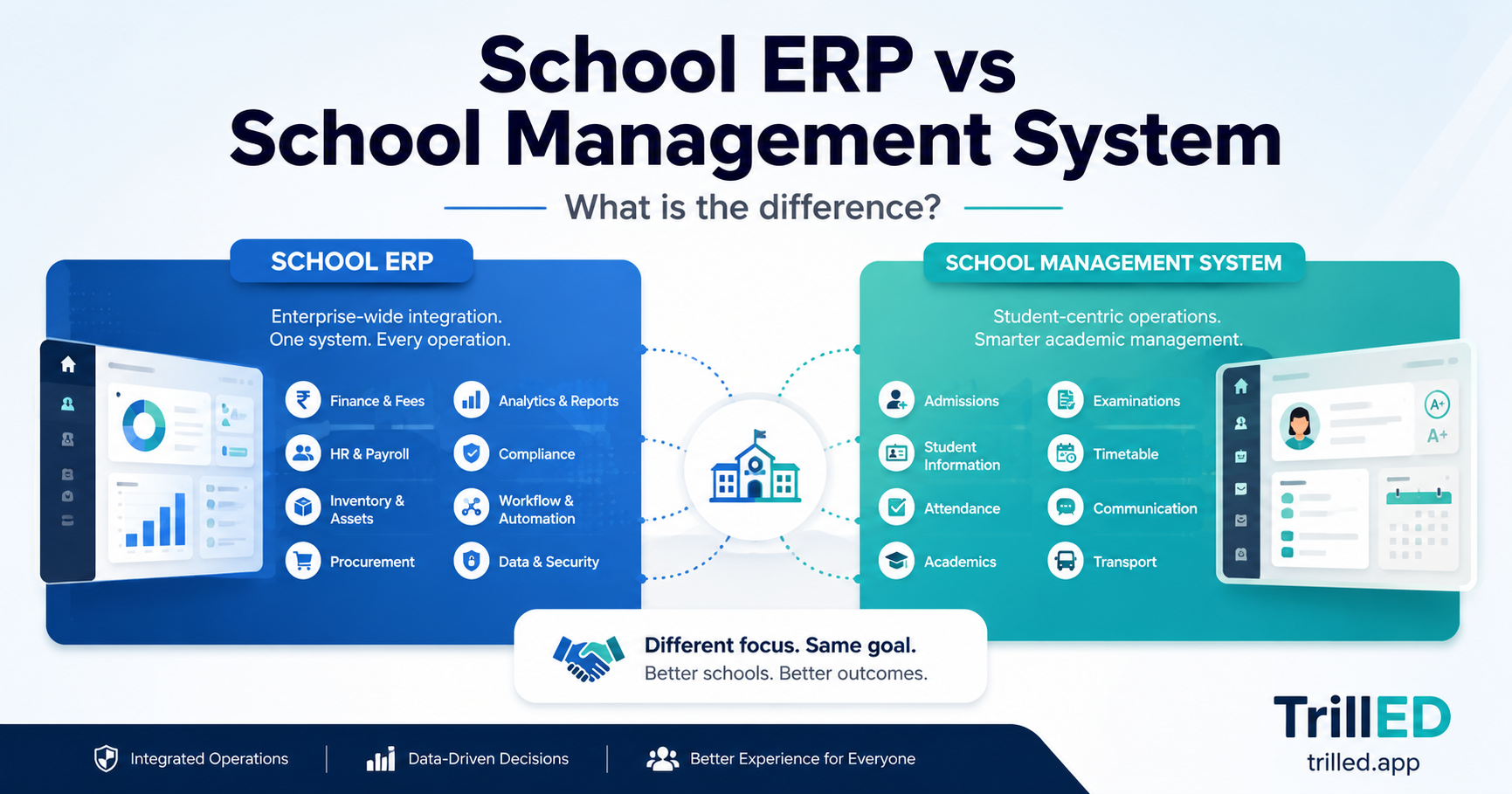
Depending on the platform, a school management system may include:
-
Student and guardian records
-
Admissions and enrolment
-
Class and subject management
-
Student attendance
-
Staff attendance
-
Timetables
-
Homework and assignments
-
Examinations and gradebooks
-
Report cards
-
School fees and payment tracking
-
Parent and student communication
-
Staff management
-
Transport operations
-
Inventory
-
Certificates and student ID cards
-
Reports and dashboards
The purpose is straightforward: to help a school manage its daily operations more efficiently from one system.
However, not every School Management System has the same level of depth.
Some are relatively simple and focus mainly on student records, attendance, and results. Others connect finance, academics, communication, staff operations, transport, reporting, and multiple branches into one platform.
This is where the term School ERP often enters the conversation.
What Is a School ERP?
ERP stands for Enterprise Resource Planning.
Traditional ERP systems were originally designed for organisations that needed to coordinate multiple departments and business processes through a shared system.
Instead of finance operating independently from procurement, inventory, human resources, and management, an ERP connects these functions so that information can flow across the organisation.
A School ERP applies a similar idea to an educational institution.
Rather than managing different parts of the school in isolation, the system attempts to connect academic, financial, administrative, and operational processes.
For example, a School ERP might connect:
-
Student enrolment with billing
-
Fee structures with student accounts
-
Attendance with reporting
-
Classes with teachers and timetables
-
Examinations with report cards
-
Staff records with attendance
-
Transport routes with students and drivers
-
Inventory with administrative operations
-
Multiple branches with central management
-
Operational data with management dashboards
The emphasis is therefore not simply on having many features.
The real ERP idea is integration between processes.
A system containing 30 separate modules that barely communicate with one another may technically have many features but still provide a fragmented experience.
A more integrated platform allows an action in one part of the school to be reflected where it matters elsewhere.
School ERP vs School Management System: The Main Difference
The simplest way to understand the difference is this:
A School Management System focuses on managing school activities. A School ERP generally aims to integrate those activities into a broader operational system.
But there is significant overlap.
A modern School Management System can provide capabilities that would traditionally have been described as ERP functionality.
This means the name of the product alone tells you very little.
A vendor may call its product a School ERP even if it provides only basic administration tools. Another vendor may call its platform a School Management System while offering deeply integrated finance, academics, attendance, communication, staff management, transport, and multi-branch operations.
Schools should therefore evaluate the platform itself rather than choosing based on terminology.
School ERP vs School Management System at a Glance
| Area | School Management System | School ERP |
|---|---|---|
| Primary focus | Managing school-specific activities | Connecting school-wide operational processes |
| Student records | Usually included | Usually included |
| Attendance | Usually included | Usually included and integrated with broader reporting |
| Academics | Core capability | Core capability integrated with other operations |
| Fees and finance | May range from basic to advanced | Typically expected to be more deeply integrated |
| Staff operations | Often included | Usually part of the wider operational structure |
| Inventory | May be optional | More commonly part of the system |
| Multi-branch management | Depends on the platform | Often expected in more advanced systems |
| Reporting | Operational reports | Cross-functional reporting and management visibility |
| Integration between modules | Varies significantly | Usually a major focus |
| Target organisation | Small to large schools | Often positioned for larger or operationally complex institutions |
This comparison is useful as a general guide, but modern platforms increasingly blur these boundaries.
Why the Difference Has Become Less Clear
The school software market has evolved.
In the past, schools often used separate applications for different purposes. One system handled student records. Another handled accounting. Teachers maintained grades independently. Attendance was recorded manually. Communication happened through SMS, email, WhatsApp groups, or paper notices.
As cloud software became more capable, school management platforms started expanding.
A single system could now manage:
-
Academic operations
-
Attendance
-
Fees
-
Communication
-
Staff
-
Parents
-
Students
-
Transport
-
Reporting
-
Administrative workflows
As a result, many modern School Management Systems now perform functions that would previously have justified the ERP label.
The question schools should ask is therefore not:
"Is this an ERP or a School Management System?"
A better question is:
"Can this system become the operational source of truth for our school?"
When Does a School Need More Than a Basic Management System?
A basic school management system may work well when operations are relatively simple.
However, problems often appear as a school grows.
For example, the school may have:
-
More students
-
More teachers and administrative staff
-
Multiple classes or departments
-
More complicated fee structures
-
Multiple payment schedules
-
Multiple branches
-
School transport
-
A growing number of parents requiring timely communication
-
More reporting requirements
-
Increasing amounts of operational data
At this stage, disconnected processes become harder to manage.
The finance team may have one version of student information while the academic office has another. Attendance records may not align with current enrolment. Parents may receive outdated information. Management may have to request reports manually from different departments before understanding what is happening.
This is where a more integrated school platform becomes valuable.
The goal is not simply digitisation.
The goal is operational coordination.
The Problem With Choosing Software Based Only on the ERP Label
The term "ERP" can sound more advanced or enterprise-ready, which makes it attractive from a marketing perspective.
But schools should be careful.
A product being called an ERP does not automatically mean that it provides:
-
Better integrations
-
Better reporting
-
Easier implementation
-
Better user experience
-
More reliable support
-
Stronger security
-
Better mobile access
-
More automation
Similarly, a platform described as a School Management System is not necessarily less capable.
The important question is whether the software solves the operational problems your school actually has.
Before choosing a platform, schools should examine how the system works in real scenarios.
For example:
Can administrators see outstanding school fees without manually combining multiple spreadsheets?
Can teachers record attendance without creating additional paperwork?
Can examination results flow naturally into report cards?
Can parents access the information relevant to their children?
Can management obtain useful operational reports without asking several departments to prepare them manually?
Can the system support multiple branches if the school expands?
Can staff members be given access based on their responsibilities?
Can the school manage communication without relying entirely on disconnected messaging applications?
These questions reveal far more about a system than whether the vendor uses the word "ERP."
What Should Schools Look for Instead?
When comparing school software, focus on the following areas.
1. Operational Coverage
Start by identifying the processes the school wants to manage.
A platform should cover the school's important workflows without forcing staff to maintain several parallel systems.
Consider academics, attendance, examinations, fees, communication, staff operations, transport, inventory, and reporting.
Not every school needs every module immediately. However, the system should provide enough room for the institution to grow.
2. Integration Between Modules
Features should not exist as isolated islands.
For example, student records should connect naturally with classes, guardians, attendance, fees, examinations, and communication.
The more staff members have to copy the same information from one module or system to another, the more opportunities there are for errors.
3. Ease of Use
A powerful system that staff members cannot use effectively will create new problems instead of solving old ones.
Administrators, teachers, finance staff, parents, and other users should be able to access the information and tools relevant to their roles without unnecessary complexity.
4. Reporting and Visibility
School leaders need more than data storage.
They need visibility.
A good system should make it easier to answer important operational questions such as:
-
How much in school fees is outstanding?
-
Which students have attendance concerns?
-
How are classes performing academically?
-
What operational activities require attention?
-
What is happening across different branches?
The ability to turn operational data into useful information is one of the biggest advantages of an integrated school platform.
5. Implementation and Support
Software is only valuable when it can be successfully adopted.
Schools should understand:
-
How the system is set up
-
How existing data is migrated
-
How staff are trained
-
What support resources are available
-
How quickly the school can begin using the system
A clear implementation process is especially important when replacing spreadsheets or older software.
6. Security and Access Control
A school system contains sensitive information about students, parents, staff, finances, and academic performance.
The platform should provide appropriate access controls so users only see the information required for their responsibilities.
Schools should also consider how data is protected, backed up, and managed.
7. Ability to Scale
A system that works for 200 students should not become unusable when the school grows to 1,000.
Schools planning for future growth should consider whether the platform can support:
-
Increasing student numbers
-
Additional staff
-
More complex operations
-
Multiple branches
-
New modules
-
Expanded reporting requirements
Choosing software only for today's needs can result in another migration a few years later.
Should Your School Choose an ERP or a School Management System?
For most schools, the decision should not be based on choosing one label over the other.
Instead, determine the level of operational integration your school needs.
A smaller school moving away from paper records and spreadsheets may initially need strong student management, attendance, academics, fees, and communication.
A larger or more operationally complex institution may require deeper integration across departments, multi-branch management, staff operations, transport, finance, inventory, and management reporting.
In both cases, the objective is similar:
Create a reliable operational system that reduces fragmentation and gives the school a consistent source of information.
Whether the vendor calls that platform an ERP, School Management System, or School Operating System is secondary.
Is TrillED a School ERP or a School Management System?
TrillED is designed as an integrated school management and operational platform.
It brings core school workflows together so that academics, attendance, finance, communication, administration, staff operations, transport, and reporting can operate within a connected environment.
Rather than forcing schools to manage important processes through disconnected spreadsheets and standalone tools, TrillED is designed to provide one operational source of truth for school owners, principals, administrators, teachers, and other authorised users.
Schools can use capabilities including:
-
Student and guardian management
-
Academic and class operations
-
Attendance management
-
Examinations and gradebooks
-
Fees and financial tracking
-
Staff management
-
Communication
-
Transport operations
-
Inventory
-
Certificates and identification
-
Multi-branch operations
-
Reporting and operational dashboards
In practical terms, this means TrillED includes many capabilities commonly associated with both School Management Systems and School ERP platforms.
But the terminology is less important than the outcome.
The goal is to help schools replace fragmented processes with a connected operational platform that can grow with the institution.
Final Thoughts
The difference between a School ERP and a School Management System is becoming increasingly blurred.
Traditionally, a School Management System focused primarily on school-specific administrative and academic functions, while a School ERP emphasised deeper integration across the institution's resources and operational processes.
Today, many modern school platforms combine both approaches.
When evaluating software for your school, do not choose based only on whether the product has "ERP" in its name.
Look at how the platform actually works.
Does it connect your important operations?
Does it reduce duplicate work?
Does it give management better visibility?
Can staff use it effectively?
Can it grow with your school?
And most importantly, can it become a reliable operational source of truth for your institution?
Those questions will tell you far more about the right system for your school than the label attached to the software.